The bank of Montréal: Money Management & Cash Flow
Launching a Native Budgeting Tool to Drive Financial Habit Formation
Timeline:
5 Months (Ongoing Development)
Role
Lead Product Designer (Initial Sole Designer)
Team
Sprint team: Product Director, Product Owner, Engineering, Business Analyst
Industry
Banking, Personal Finance, B2C
Skills
UX Strategy, Design Thinking, User Research, Prototyping
Context setting
Implementing Budgets into Our Roadmap
Budgets is a flagship roadmap feature under the Manage My Cash Flow portfolio on the Secure Retail Canadian Banking Platform at the Bank of Montréal (BMO). It empowers users to proactively monitor their spending, set financial goals, and improve their money management behaviors — directly from their online banking dashboard.
As the sole product designer on the Money Management platform, I led the initial ideation, design workshops, and cross-functional alignment that helped define and deliver the foundation for this tool — while continuing to support the Goals and Financial Insights products. A key priority was ensuring this new functionality integrated seamlessly into the existing platform.
Recognizing a need for stronger alignment between product and engineering on priorities and objectives, I proposed and facilitated a cross-functional workshop — a first for many team members. This brought together stakeholders from product, design, engineering, and leadership to align on strategy, clarify user needs, and ensure a shared understanding of the feature's goals. Two additional designers were later added to the team as the project scaled.
Problem Definition
Why a Budgeting Tool?
Many Canadians struggle to visualize and manage their finances. Our user research revealed:
01
Spending tracking is inconsistent
03
Users need contextual suggestions, not just raw data
02
Budgeting tools are often too complex or disconnected from real-time banking
04
Overspending happens without visibility or accountability
Business Need
BMO lacked a native budgeting solution, limiting its ability to compete with challenger banks and fintech apps. Our opportunity: deliver a personalized, intuitive, and integrated budgeting feature to increase digital engagement, product adoption, and customer satisfaction.
Project Goals
01
Deliver BMO's first budgeting tool
Integrating it into the broader money management suite
02
Encourage proactive financial habits
Help users adopt better spending and saving behaviors
03
Lay the groundwork for future features
Enable future goal-setting and automation features
04
Increase engagement
Boost retention among digitally active users
Problem Definition
We analyzed previous research from 25 user interviews to understand budgeting motivations. It was found that people budget to:
To know where their money is going
To hit savings goals
To pay down debt
To identify discretionary spending
To maximize what's left over
Peer influence
This helped our team identify important emerging insights that would be explored further in our workshop:
Users want real-time visibility into spending patterns
Many want suggested budgets, not just manual entry
Autonomy matters: users want the ability to customize and recategorize expenses
Method
To align teams and define our MVP, I led a cross-functional UX strategy workshop. Many in the sprint team had never participated in this type of design thinking process before — making this both a strategic and cultural milestone.
The workshop goals were clear: clarify user needs, prioritize features based on value and feasibility, align across product, engineering, and business teams, and set a design and delivery roadmap. Below is a walkthrough of each stage, from purpose-setting through to the final solution sketching.
Workshop Impact
The workshop was a breakthrough moment that enabled faster, better-aligned development. It helped shift the working culture from siloed to collaborative — producing a shared vision, clear sprint objectives, and prioritized features like category customization, automated tracking, and spending insights.
1
Setting the Purpose
We opened by aligning the team on why we were gathered. The Money Management and Cash Flow Team was preparing to launch a new Budgets feature for the F24 fiscal year. This session would frame the problem, surface pain points, identify constraints, and define an appropriate design direction — using the time to ideate, discuss, and commit to a product direction.

Workshop Slide — Purpose
2
Phase 0: Rapid Product Design & Development
I introduced the Phase 0 framework that would guide our process. During the workshop, we would focus on three pillars: Frame the Problem, Empathize, and Ideate & Co-create. After the workshop, the design team would carry the outputs through Prototype & Test, Define MVP, Iterations, and Release. Design thinking tools from the Board of Innovation were used throughout the session.
Workshop Slide — Phase 0 Framework
3
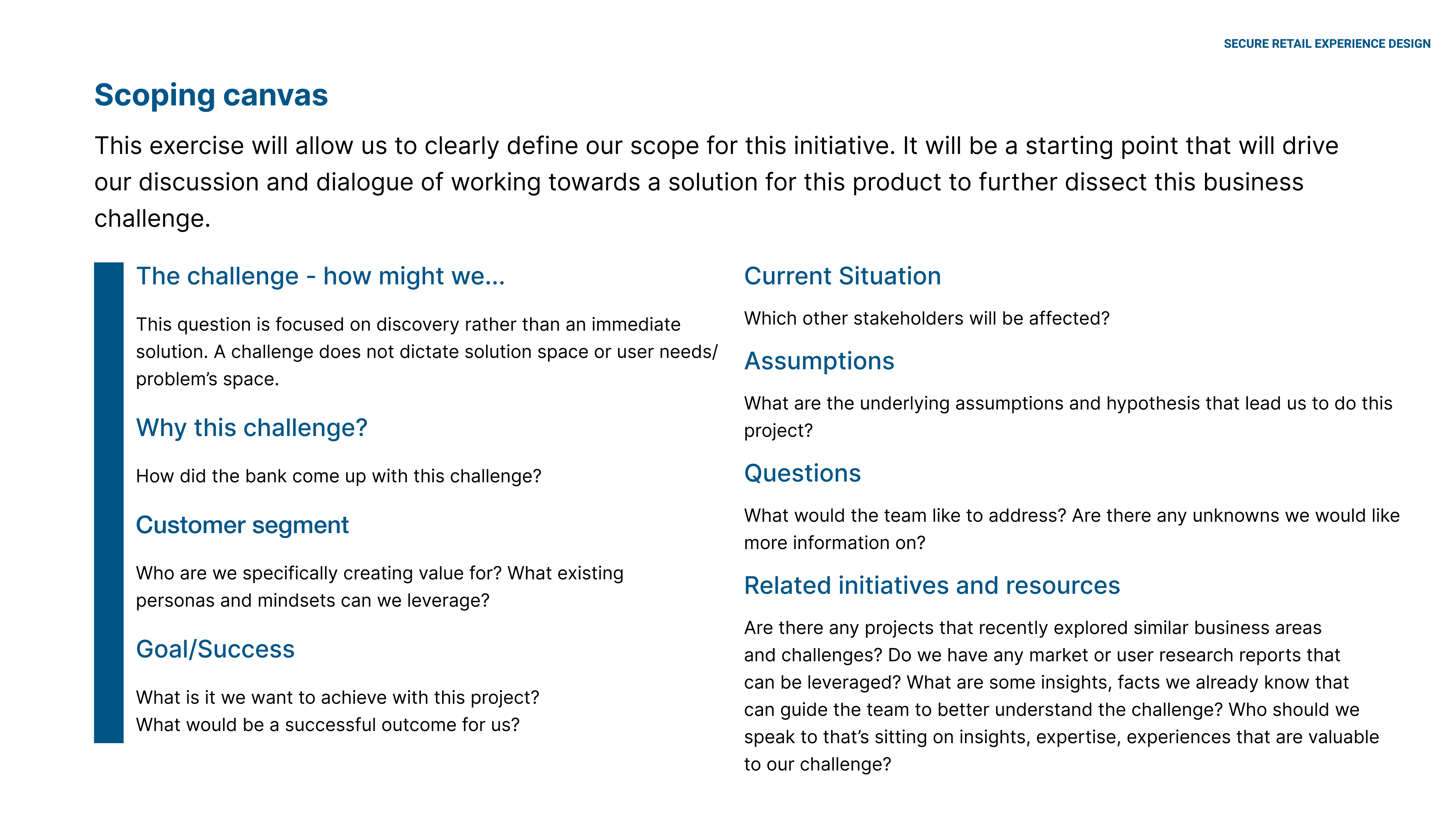
Scoping Canvas
To define our scope, we used a Scoping Canvas — a structured exercise that drove dialogue around the business challenge. The team collaboratively answered critical questions including: "How might we..." challenge framing, customer segmentation, goal and success definitions, assumptions, and related initiatives. This served as the foundational artifact that all subsequent activities built upon.
Workshop Slide — Scoping Canvas
4
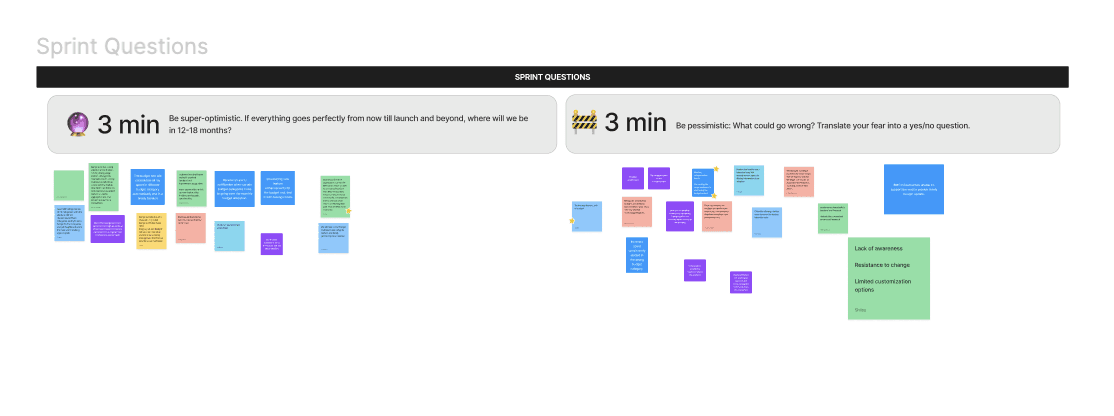
Sprint Questions
We pushed the team to think in two directions. First, an optimistic framing: "If everything goes perfectly from now till launch and beyond, where will we be in 12–18 months?" Then a pessimistic one: "What could go wrong? Translate your fear into a yes/no question." This exercise surfaced hidden risks and aspirational targets that helped prioritize our efforts.
Workshop Slide — Sprint Questions
5
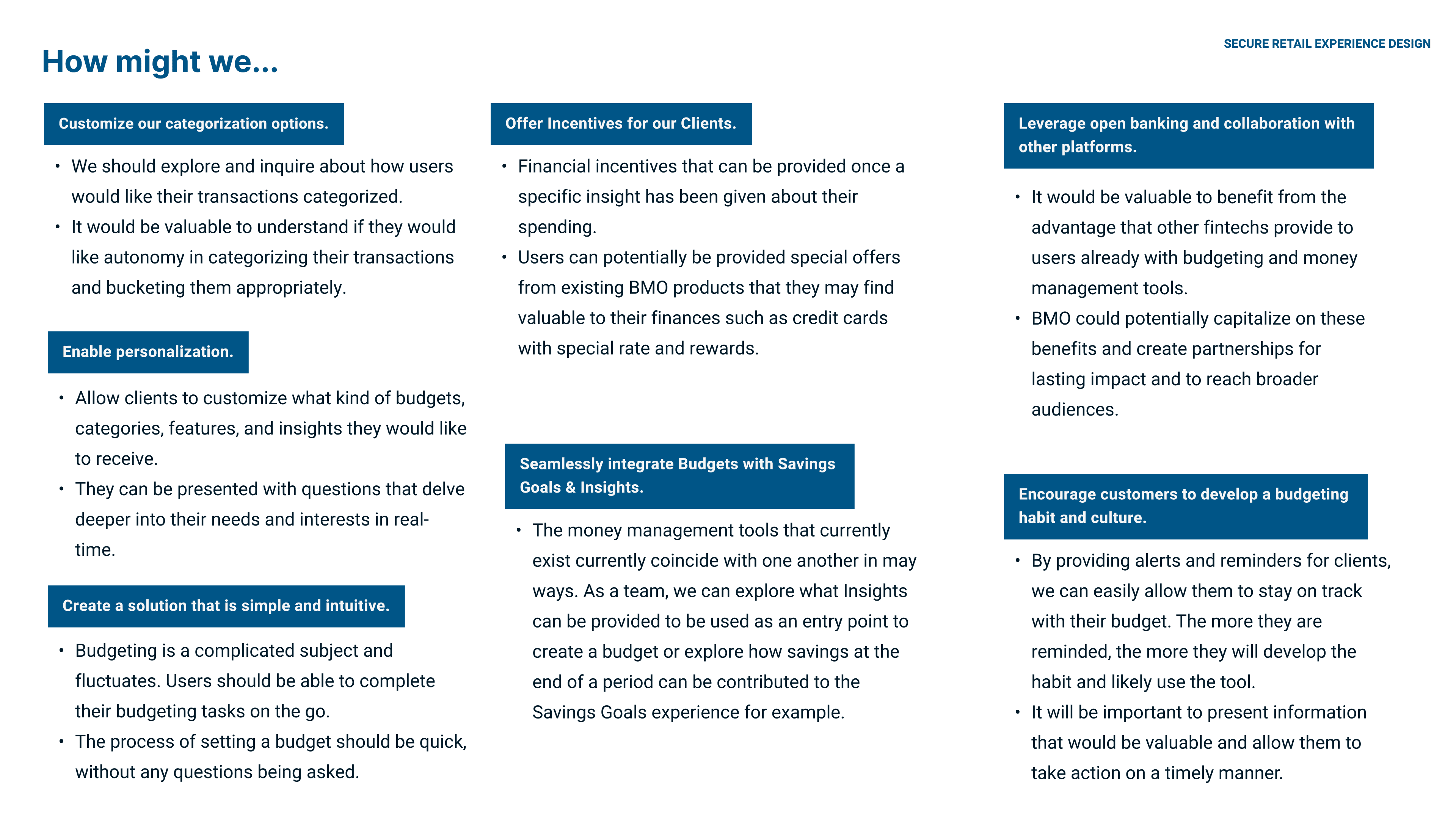
How Might We...?
We used the HMW framework to turn our identified insights into actionable opportunities. Each statement followed a structure of Action + Subject + What. The team then explored variations — highlighting the good, removing the bad, questioning assumptions, adding adjectives, leveraging unexpected resources, making analogies, and changing the status quo — to broaden the ideation space.
Workshop Slide — How Might We
6
Customer Journey Mapping
We mapped the end-to-end journey of a BMO mindset persona ("Passionate Risk Taking — Amaya") across four phases: Exploration, Consideration, Observation, and Decision. For each phase, the team documented actions, painpoints, feelings, opportunities, and channels. This exercise highlighted where friction lives in the current budgeting experience and where our solution could create the most value.

Workshop Slide — Customer Journey Map
7
Lightning Demos
Team members shared inspiring products, services, and experiences — looking outside of our industry and field. The goal was to be visual: show websites, apps, and videos, and explain what stood out. Standout ideas were captured as screen grabs and pasted onto a shared board. This broadened our design vocabulary and brought fresh perspectives into the solution space.
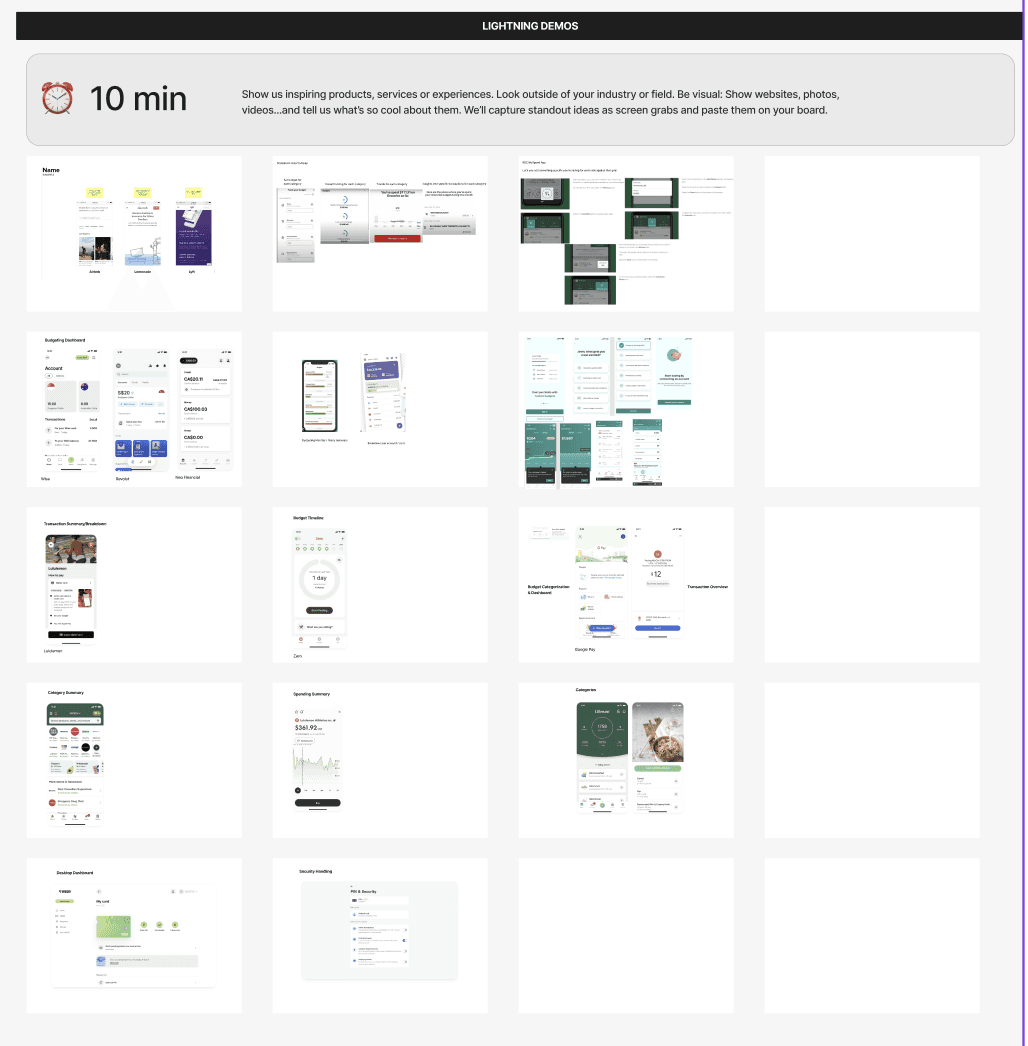
Workshop Slide — Lightning Demos
8
Collaborative Sketching
With the problem dissected, the team moved to imagine what the solution might look like. The exercise progressed through three stages: Notes (private brain-dump of everything on your mind), Ideas (get visual — doodle interesting ideas, ugly is OK), and Solution Sketch (a clear, self-explanatory concept to share with others). This structured approach ensured every voice contributed to the final direction.
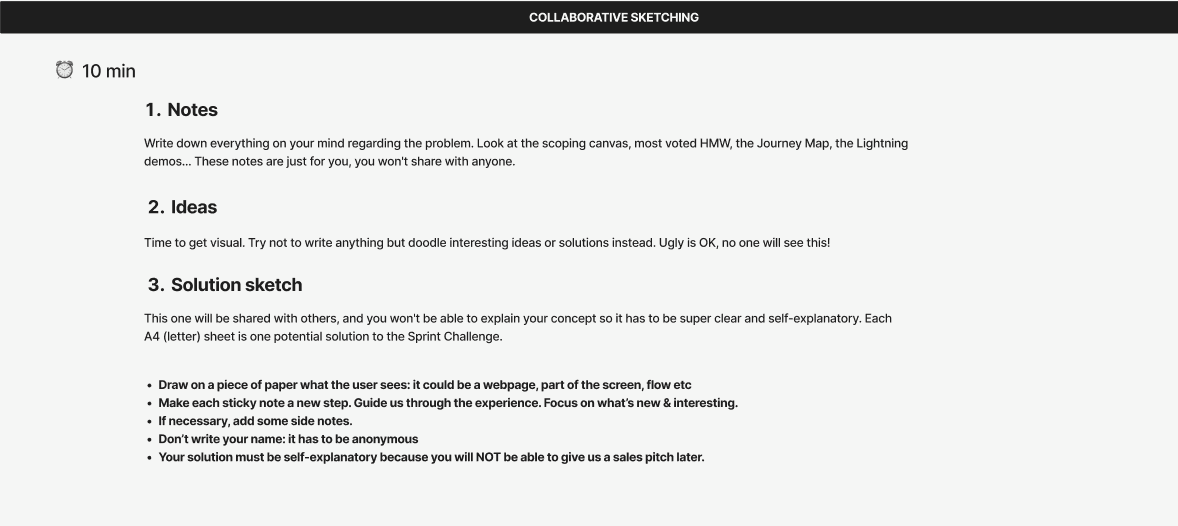
Workshop Slide — Collaborative Sketching
9
Next Steps
We closed the workshop by outlining how the findings would carry forward through the Phase 0 framework: the design team would synthesize outputs into prototypes, define the MVP scope, run continuous iterations based on stakeholder and user feedback, and prepare for release once the product reached sufficient value. We were transparent that not all user expectations would be fulfilled in the initial launch.
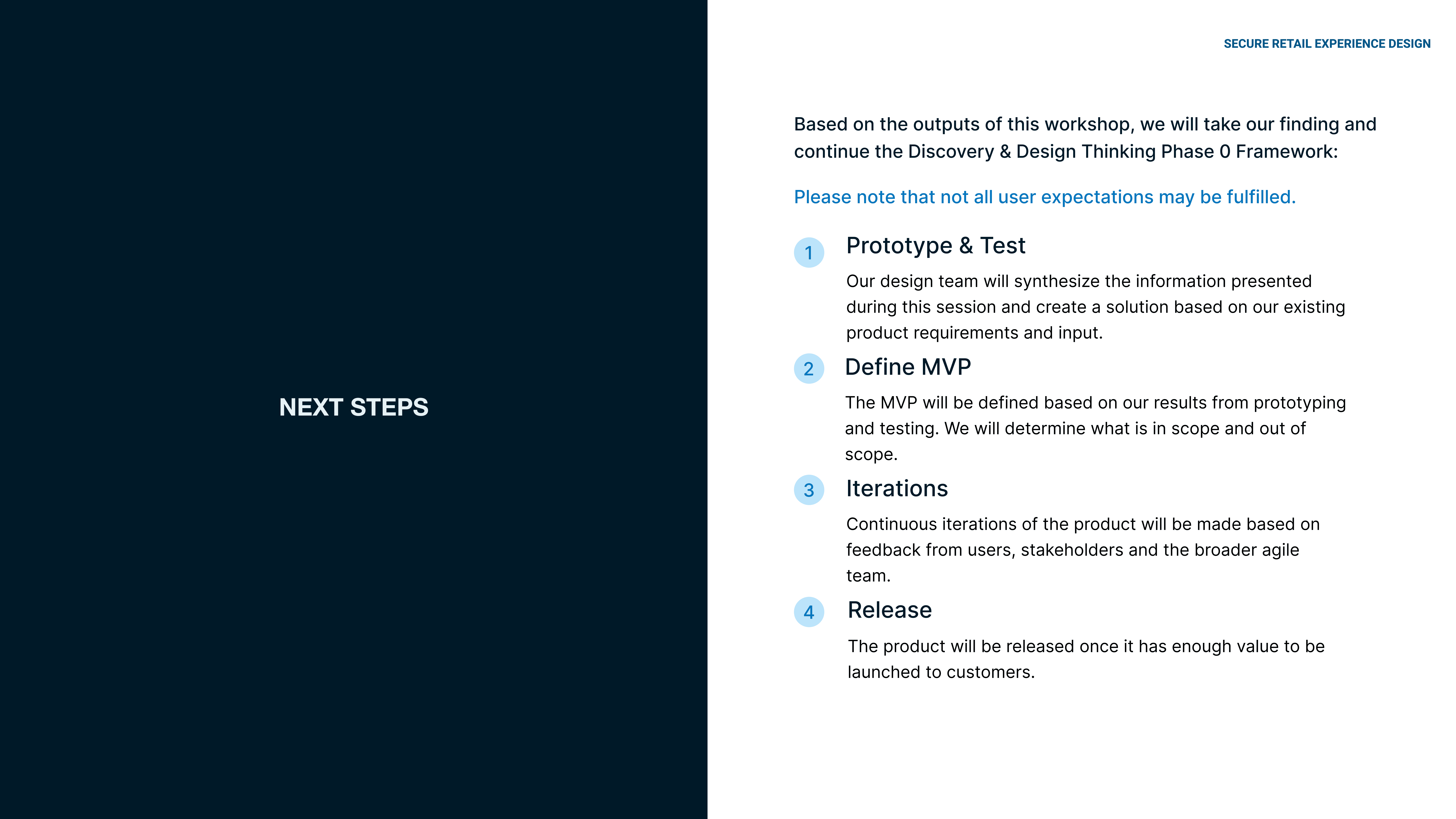
Workshop Slide — Next Steps
Workshop Outcomes & Priorities
The workshop produced four key priorities that guided the design direction for the budgeting MVP. These priorities emerged directly from the team's collaborative exercises.
Priority 01
Customize categorization options
Explore how users want their transactions categorized and whether they'd like autonomy in bucketing them appropriately.
Priority 02
Simple and intuitive
Users should be able to complete budgeting tasks on the go. The process of setting a budget should be quick, without unnecessary questions.
Priority 03
Integrate with Savings Goals & Insights
Explore what Insights can be entry points to create a budget, and how end-of-period savings can contribute to the Savings Goals experience.
Priority 04
Encourage budgeting habits
Alerts and reminders help clients stay on track. Presenting timely, actionable information will develop consistent usage of the tool.
Mapping the Journey
I initiated design explorations based on real-world financial flows, mapping out the complete user journey from the Account Summary entry point through budget creation, category selection, and ongoing management. Key questions guided the exploration:
How should we help users set budgets: manual vs. suggested?
What visual models best show progress toward a goal?
Where should this live within the Secure Platform alongside Savings Goals and Insights?
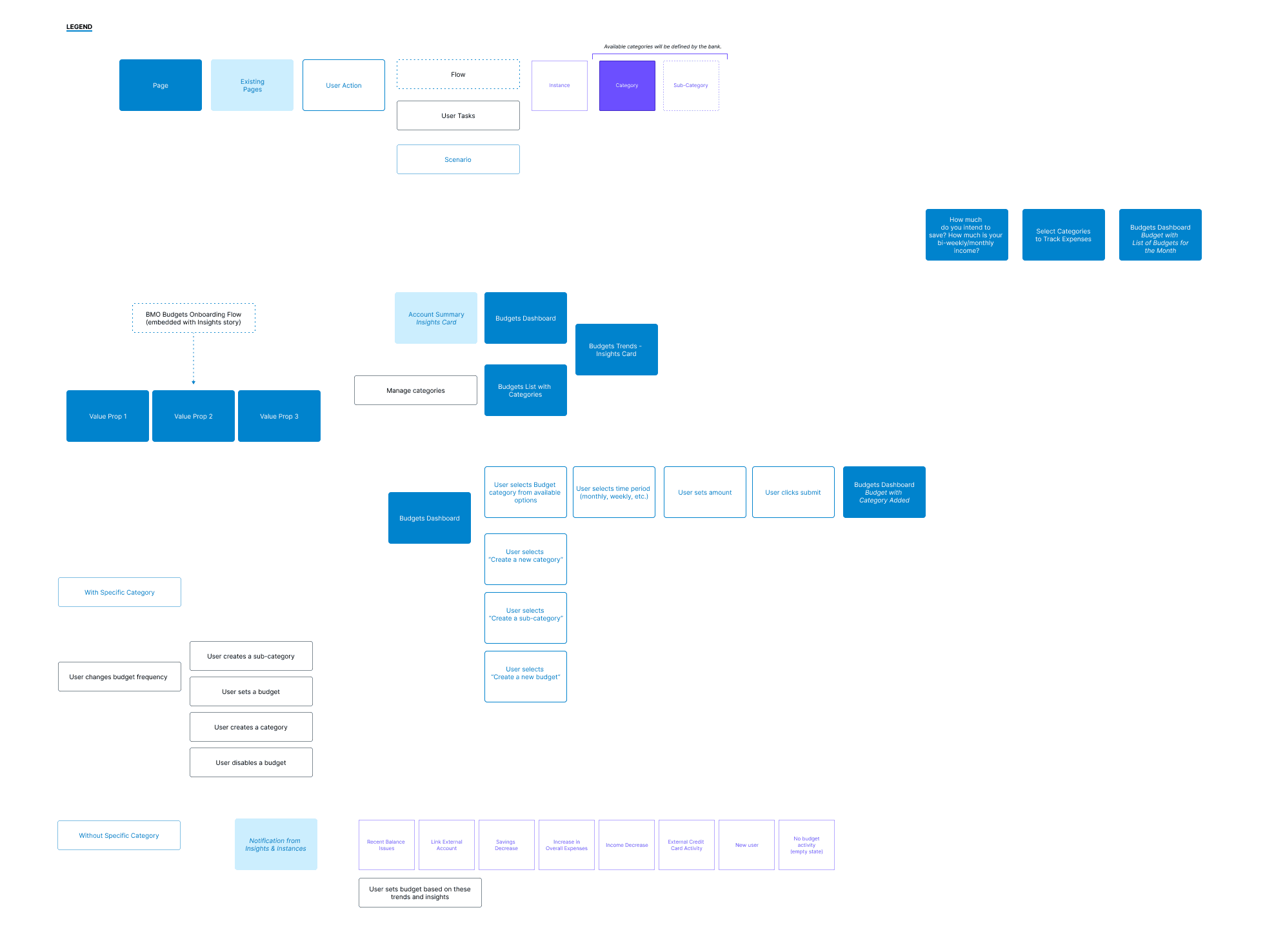
Validation
User Testing & Insights
We conducted surveys to understand budgeting preferences, discretionary spending monitoring habits, and budget revision frequency.
Monthly
Majority preferred monthly budgeting cycles
Visual
Users wanted visual feedback on overspending
Tips
Participants asked for goal recommendations and tips for improvement
Design Solution
Final Experience
Using components from the BMO design system and constraints of technical partner Personetics, I designed a flexible budgeting interface built around three core principles that emerged from our workshop and research:
Smart categorization — auto-suggested based on historical transaction data, with full user overrides for recategorization
Progressive disclosure — show details when needed, keep core UI simple — budget summaries mapped to spending categories
Seamless integration — embedded within the existing Account Summary, alongside Savings Goals and Insights
1
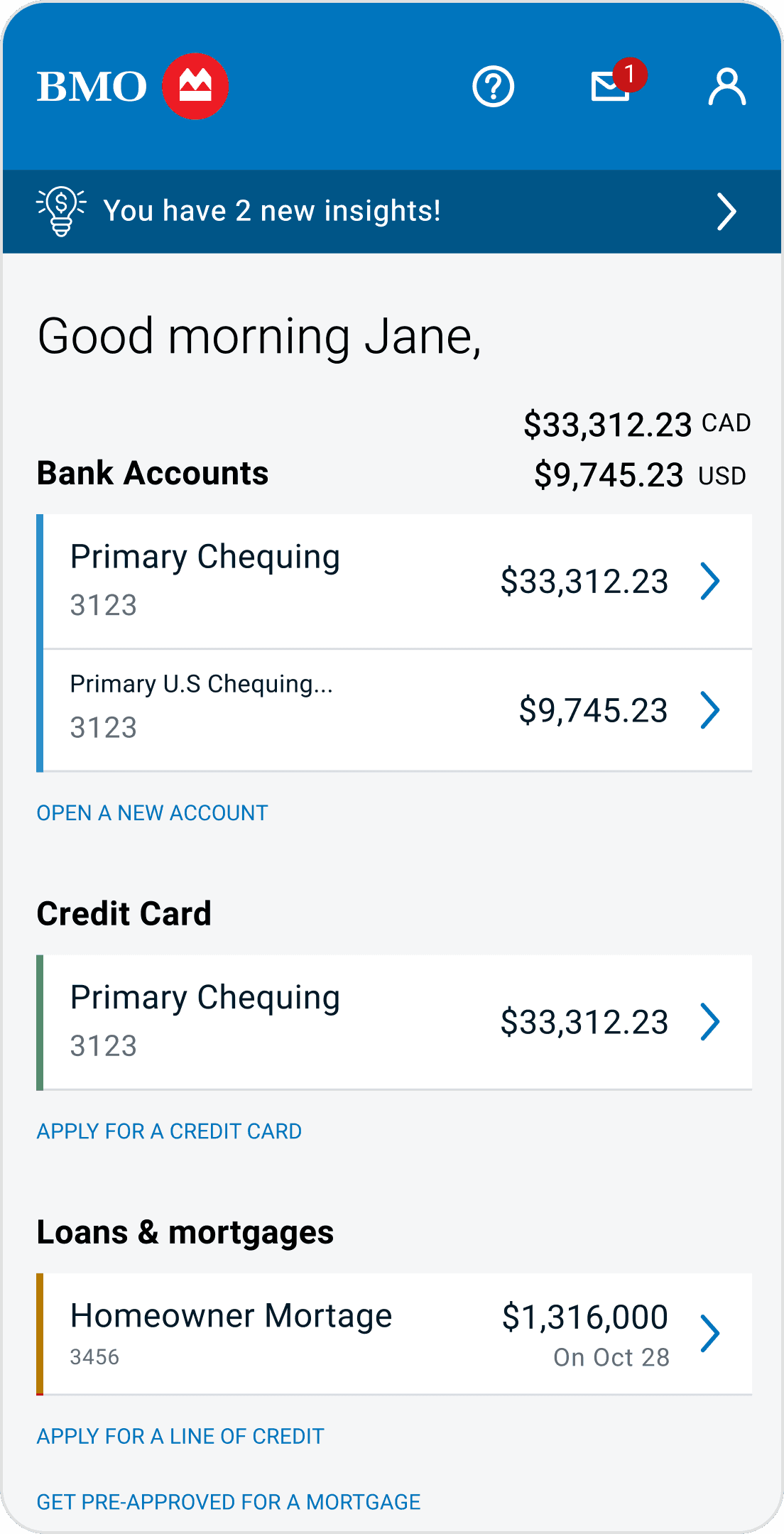
Entry Point: Account Summary
The budgeting feature lives within the Account Summary — the most visited screen in the app. A "Your budgets" section appears below the account listings, surfacing contextual insights like "Better manage your spending — recently you had some balance issue." This placement ensures discoverability without disrupting existing workflows, and the personalized nudge encourages users to take their first step.
2
Onboarding: Introducing BMO Budgets
When users tap "Start Budgeting," a takeover modal introduces the feature with a clear value proposition: "An easier way to track your expenses." The screen explains how budgeting works in five simple steps — define goals, select accounts, update income, customize categories, and track. This transparency was a direct response to research showing that budgeting tools often feel intimidating. The callout box and ordered list reduce cognitive load, while the privacy disclaimer builds trust — critical in a banking context.
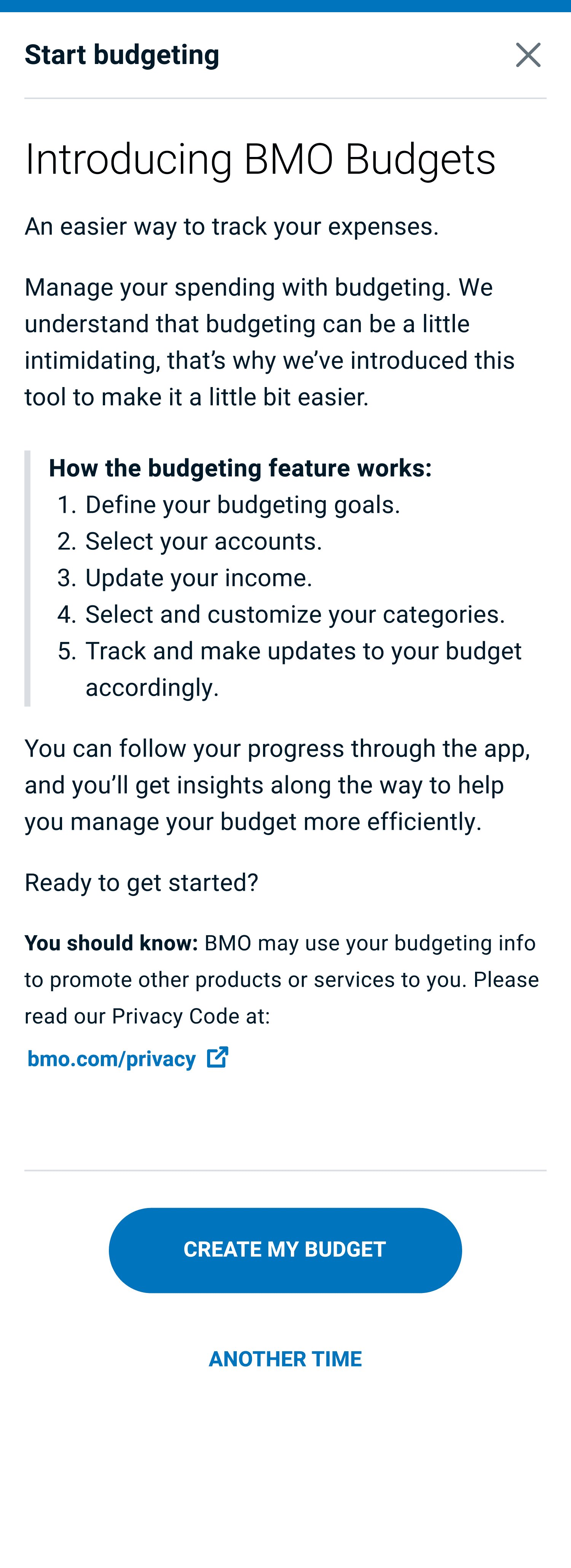
Introducing BMO Budgets
A welcoming onboarding screen explains the feature and sets expectations before users commit.
3
Money Management Goals
Users select their primary budgeting motivation — achieving savings goals, growing investments, paying off debt, understanding spending habits, or simply breaking even. This step personalizes the experience and feeds into future recommendations. The radio button pattern keeps selection fast and unambiguous, aligning with our workshop priority of keeping setup "simple and intuitive" so users can complete it on the go.
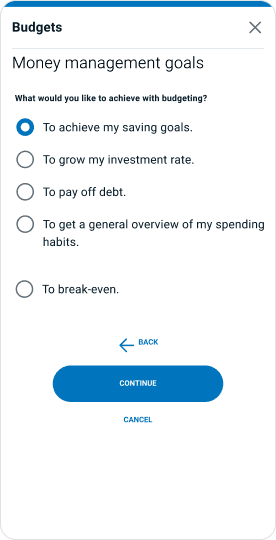
Money Management Goals
Users define their intent, personalizing the budgeting experience from the start.
4
Budget Setup
The core configuration screen lets users set their budget cycle (monthly), choose a start date, and customize spending categories. Each category — Housing, Food & Dining, Transportation, Education, Entertainment, Shopping, Insurance — shows a default suggested amount alongside the monthly average, directly addressing the research insight that users want "suggestions on the amounts they should set." Progressive disclosure via collapsible accordions keeps the interface clean while giving power users full control.
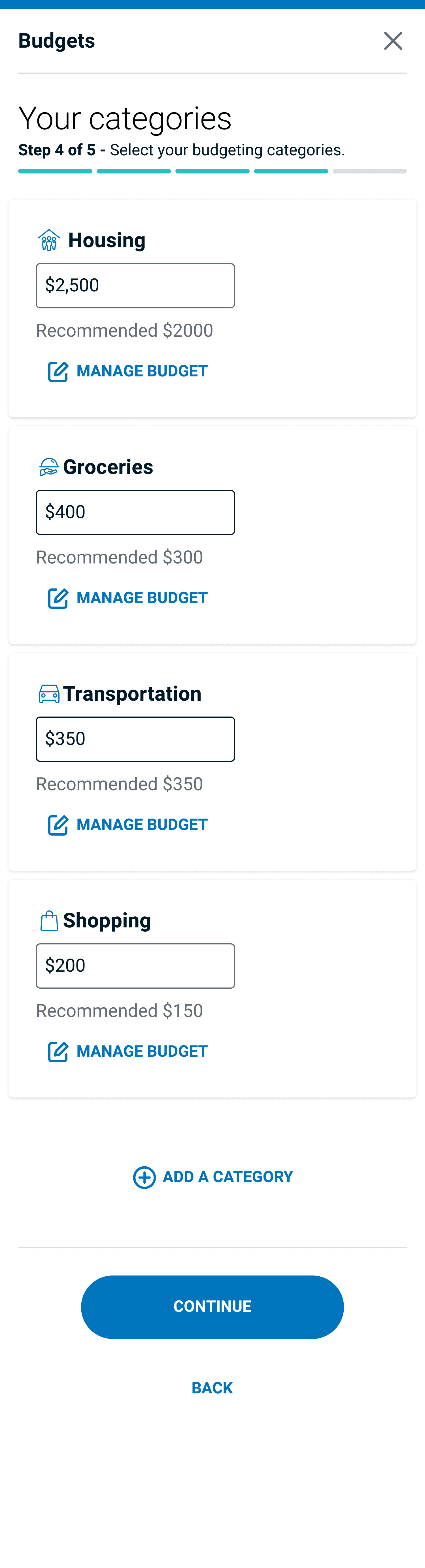
Set Up Your Budget
Budget cycle, account selection, and category-level customization with smart defaults based on spending history.
5
Category Customization
Once budgets are set, users see a confirmation screen summarizing their active categories with set amounts. This moment of accomplishment was designed to reinforce the habit-forming loop our workshop identified. The screen also surfaces a contextual cross-sell offer — in this case, a credit card rewards promotio.
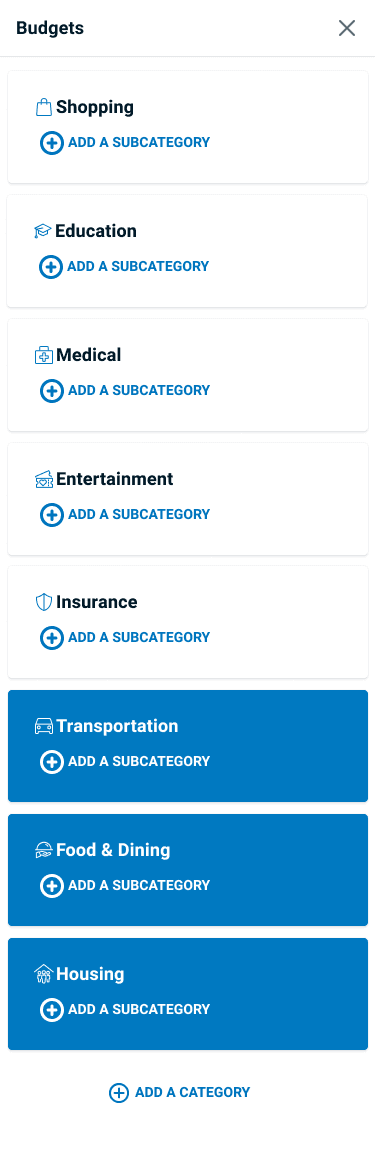
Category Customization
Summary of active budgets with a contextual cross-sell offer — driving product adoption at a moment of engagement.
6
Confirmation & Cross-sell
Once budgets are set, users see a confirmation screen summarizing their active categories with set amounts. This moment of accomplishment was designed to reinforce the habit-forming loop our workshop identified. The screen also surfaces a contextual cross-sell offer — in this case, a credit card rewards promotion — demonstrating how the budgeting feature creates organic opportunities for product adoption without feeling intrusive.

Onboarding Confirmation
Summary of active budgets with a contextual cross-sell offer — driving product adoption at a moment of engagement.
Key Design Decisions
Customize categorization options
Explore how users want their transactions categorized and whether they'd like autonomy in bucketing them appropriately.
Simple and intuitive
Users should be able to complete budgeting tasks on the go. The process of setting a budget should be quick, without unnecessary questions.
Integrate with Savings Goals & Insights
Explore what Insights can be entry points to create a budget, and how end-of-period savings can contribute to the Savings Goals experience.
Encourage budgeting habits
Alerts and reminders help clients stay on track. Presenting timely, actionable information will develop consistent usage of the tool.
Results & Reflection
Impact
Created a scalable design that influenced BMO's broader money management roadmap
Built a shared language around UX with sprint teams, improving collaboration long-term
Earned positive feedback from product leadership and beta testers
What's Next
Currently in build phase with expected pilot release:
Add savings suggestions and automation
Enable multi-goal budgeting
Deeper integration with transaction analytics and notifications
Lessons Learned
Facilitating cross-functional UX workshops builds momentum and clarity
Budgeting is deeply personal — flexibility and empathy are key in design
Early collaboration with stakeholders drives alignment and reduces churn
Designing for B2C banking requires balancing regulatory constraints, business needs, and user emotions
additional work